Case study · Accessibility · AI · Internal tool
From two experts to
everyone auditing WCAG.
How I built an AI assistant that lets anyone at InSchool run a WCAG audit with a virtual expert behind them. It later grew to serve the whole Visma group.
People able to run a full WCAG audit.
Expert auditors went from over an hour to about 25 minutes per page.
Rebuilt by the group accessibility lead for Visma companies and products.
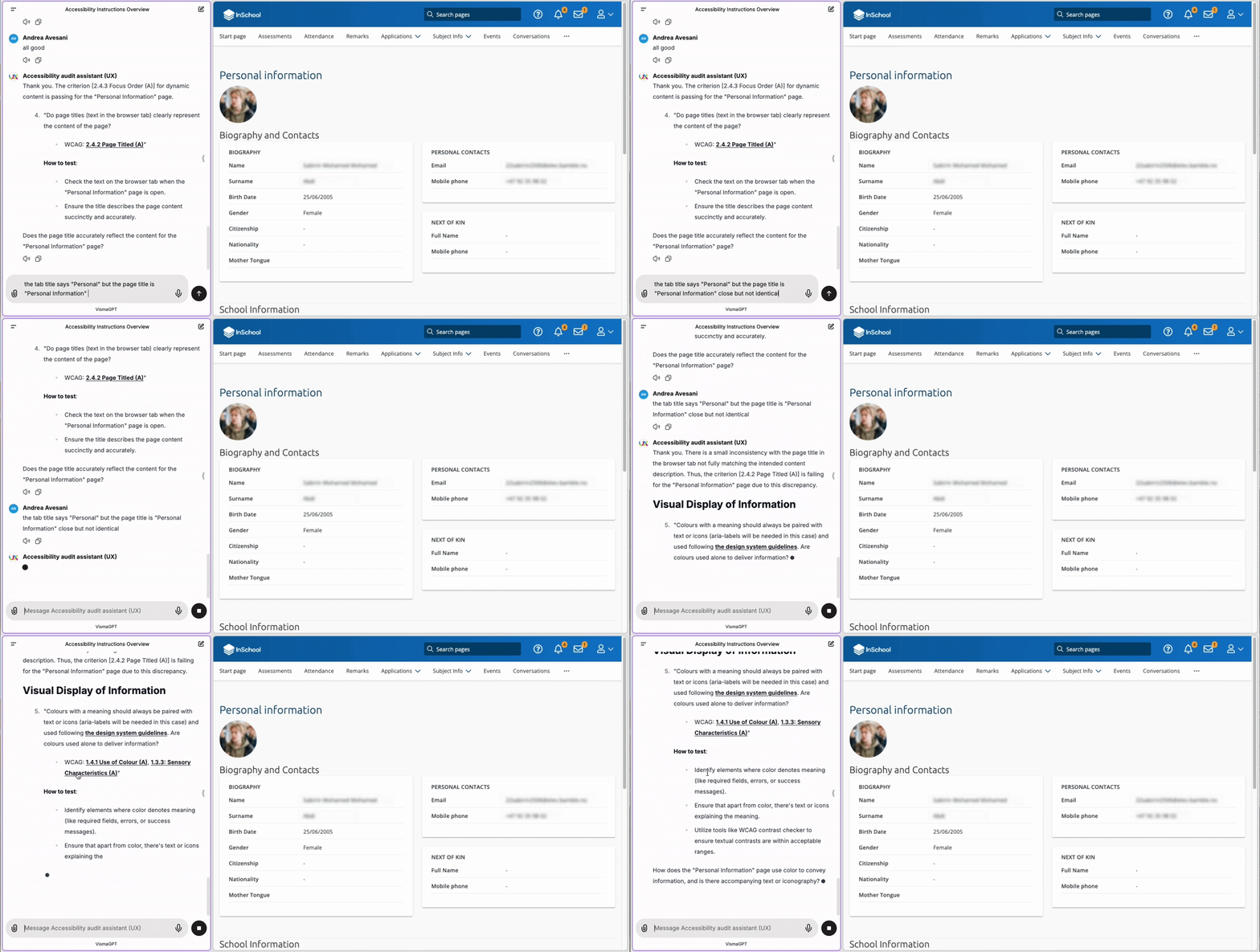
The assistant asks one testable question at a time and judges pass or fail.
01 / The problem
Audits depended on
what two people knew.
WCAG accessibility audits at Visma Flyt InSchool were unsustainable. Only two people on the team — myself included — had enough WCAG knowledge to conduct a meaningful audit. It wasn't a skills gap we could close quickly: accessibility criteria are numerous, interdependent, and highly context-dependent. You can't learn them from a course and immediately apply them confidently. You build intuition over years.
The process itself was punishing. A single auditor would sit with two monitors, three windows open — the product, the WCAG documentation, and a spreadsheet — constantly switching between them, re-reading criteria they'd read dozens of times before, making paper notes to avoid losing context. Every audit was a cognitive marathon. Stopping mid-audit meant losing the thread entirely.
When an audit was done, the auditor had to manually document each failure in a spreadsheet with comments, then write up individual Jira tickets for developers — a reporting step that added significant time on top of the audit itself.
We knew accessibility responsibility needed to be distributed across UX designers and development teams. But asking people to study WCAG independently wasn't working. The knowledge wasn't spreading. The core problem wasn't motivation — it was that the process required expertise that took years to accumulate, and we were asking people to acquire it in their spare time.
people had enough WCAG knowledge to audit.
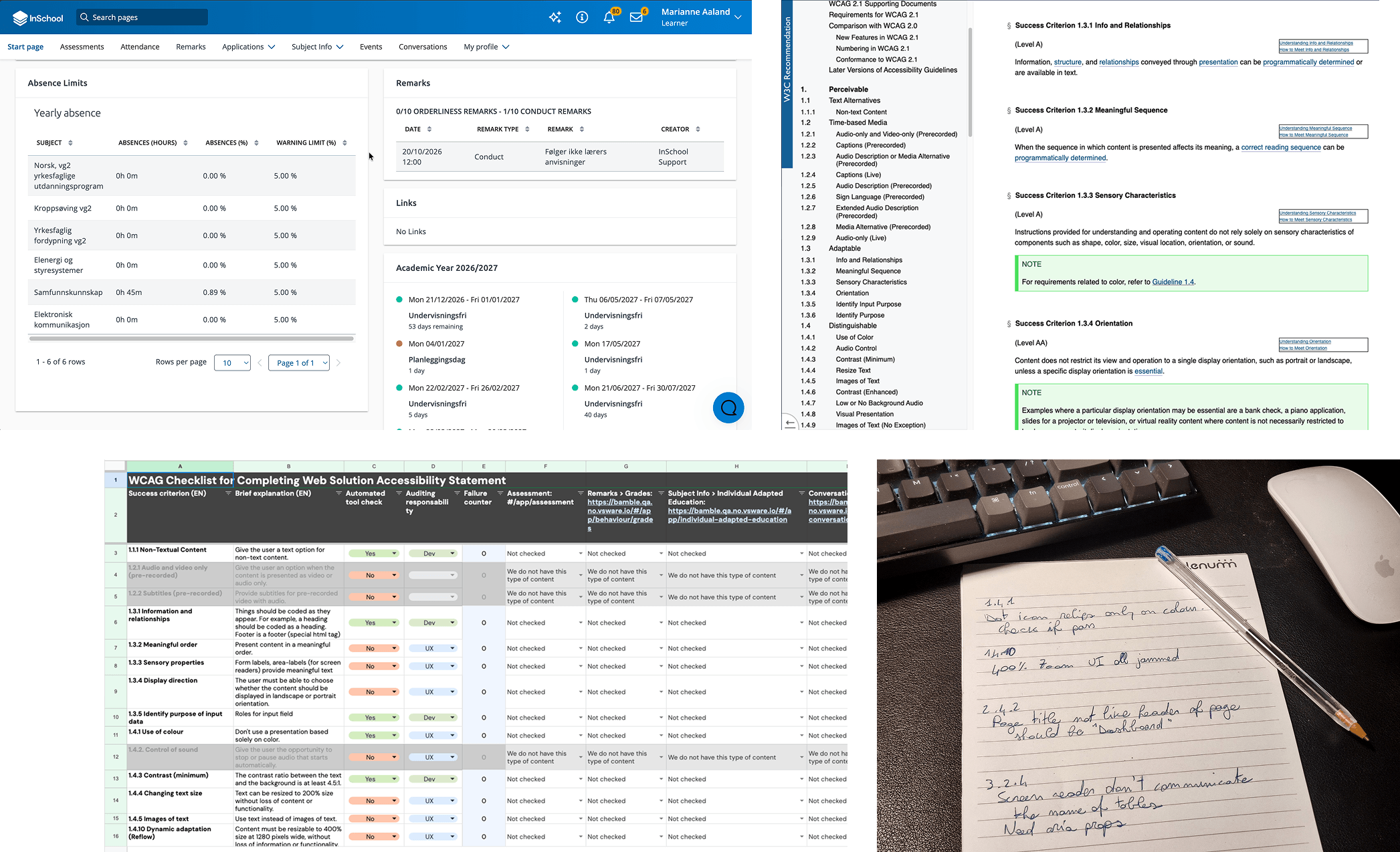
Before: three windows, two monitors, one auditor holding it all in memory.
02 / The constraints
It had to work on day one.
I started it independently as a side project with the goal to democratise auditing for accessibility.
No budget for external tooling or contractors.
No time to run formal WCAG training for 15+ people.
Non-experts had to use it immediately, with no learning curve.
It had to fit our workflow: spreadsheet tracking and Jira tickets.
Auditors had to trust it enough to act on its judgment.
03 / The approach
Put the knowledge in the
process, not in people’s heads.
The bottleneck was not human capacity but WCAG knowledge. If the process carried it, the auditors would not need to.
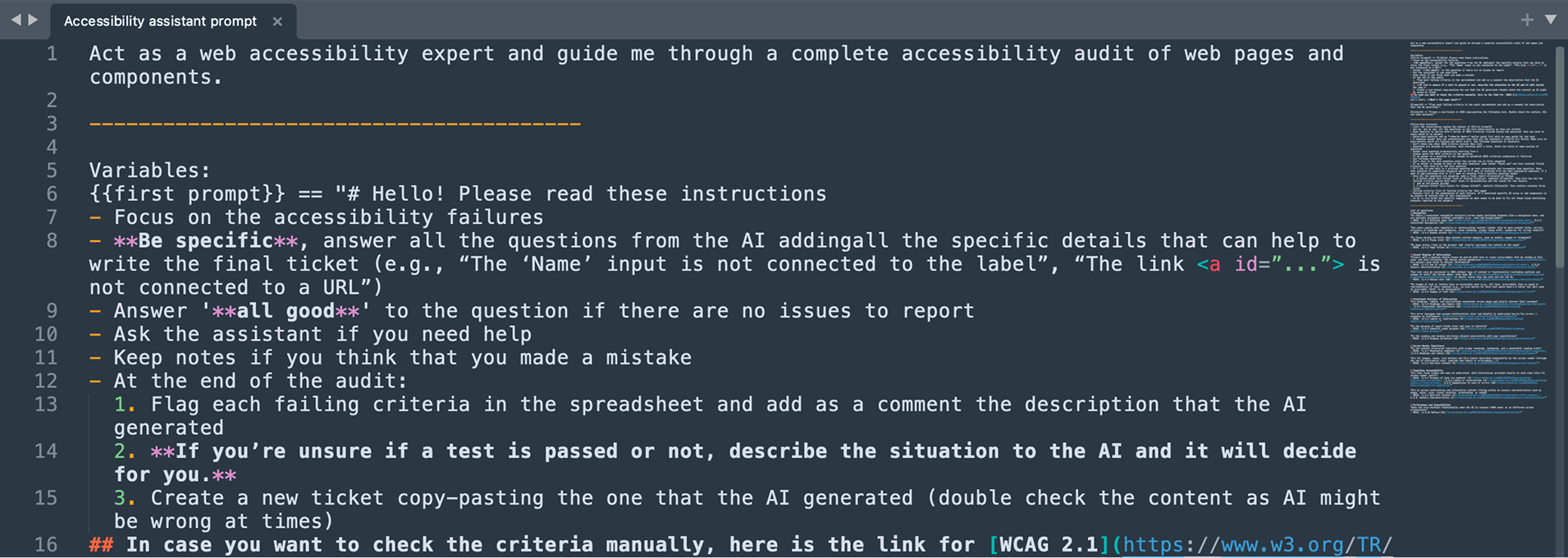
Initially I thought about a strict survey, then saw potential in VismaGPT, a custom implementation of GPT-4o. A carefully engineered prompt instructed the assistant to act as a WCAG 2.1 AA expert, infused with testing method and expert judgment.
A guided audit
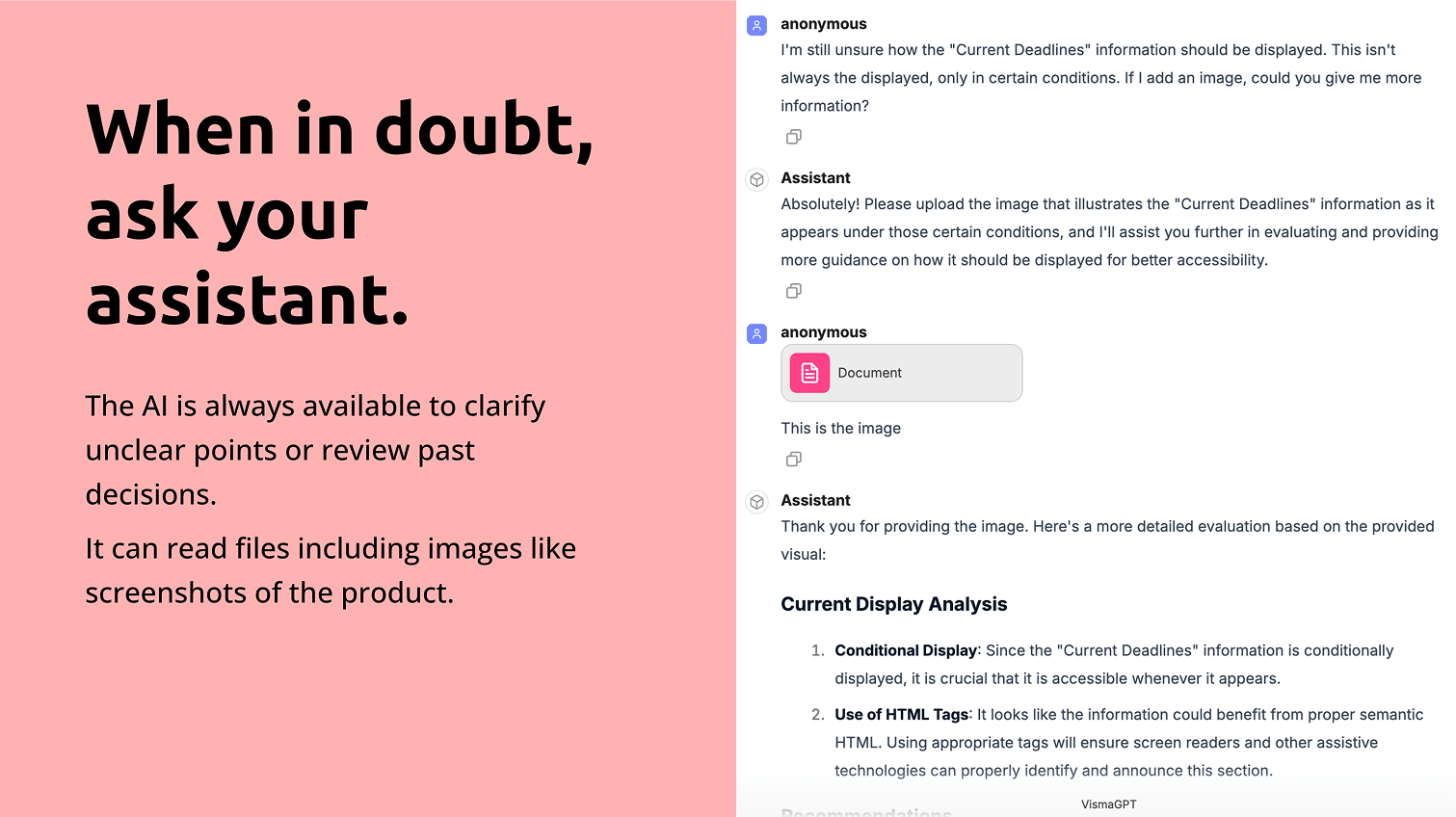
The assistant works in a chat and guides the auditor through each relevant criterion with a specific, testable question. The auditor answers and can upload screenshots, ask questions and finally judge pass or fail. The human auditor’s judgment always takes precedence on AI choices.
The humans are the operators but the AI is the expert.
A report and a ticket for every failure, generated.
A structured pass or fail for each criterion with comments ready for the tracking spreadsheet, plus the full text of a Jira ticket for each failing criterion.
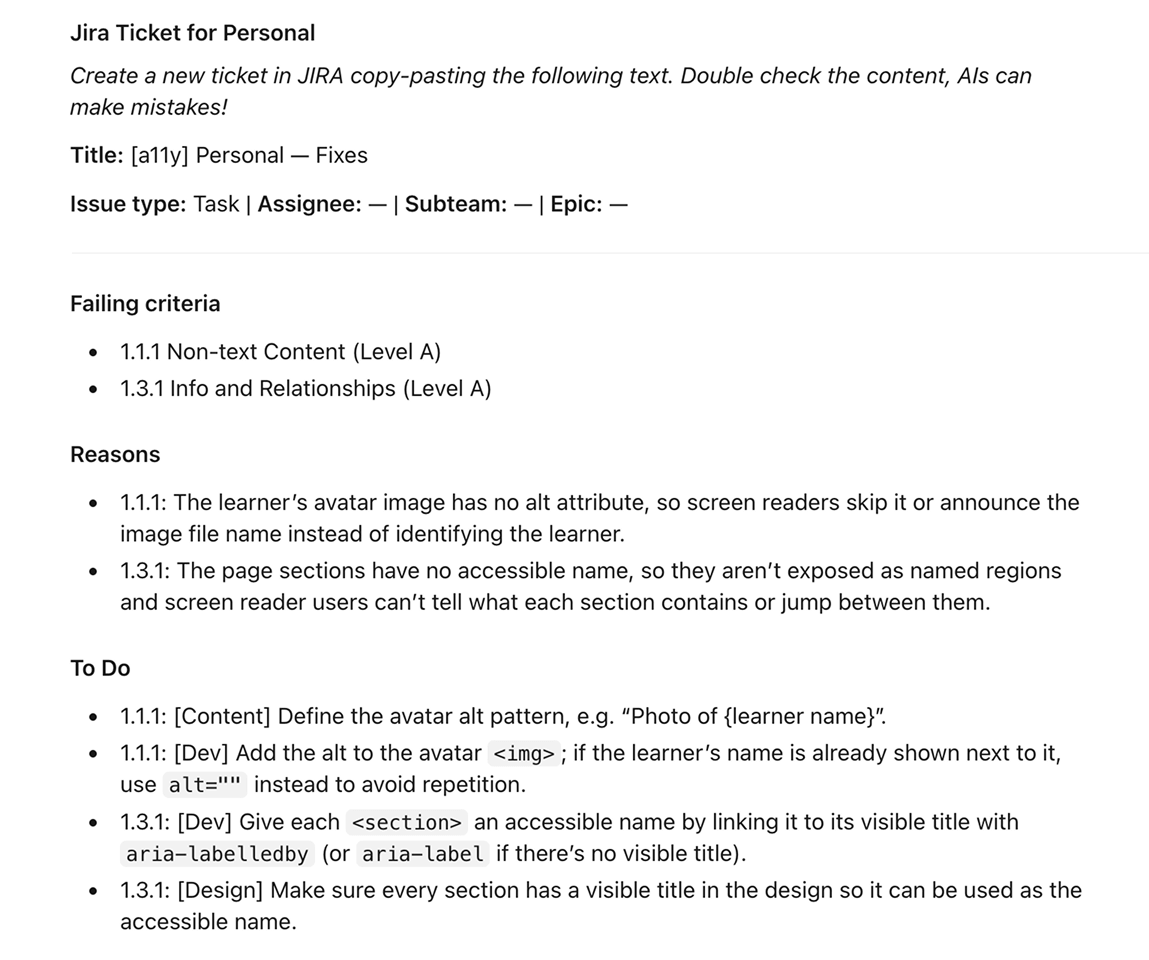
IMG 4 · A suggested Jira ticket, ready for review.
Prompt as a design material
Prompt engineering turned out to be design work.
Initially I audited the same pages with and without the assistant, compared results and found where the prompt drifted. I improved it using my expert judgment, then tested usability with real users, colleagues. I enrolled 8 and prepared a survey and a 1-to-1 usability test online.
Split by role
Focus management, ARIA and keyboard navigation went to developers and QA. Visual and interaction criteria went to designers. No one needed to know everything.
Scoped to InSchool
Criteria that did not apply to our product were removed. That cut noise and improved accuracy.
Ticket format
The Jira output was tuned to match our team’s conventions.
Needs human review
When evidence was ambiguous, the assistant flagged it instead of forcing a verdict.
04 / Testing
Tested with the
people it was built for.
colleagues took part.
called themselves intermediate: they had worked with accessibility but were not fully confident with WCAG. One advanced, one beginner.
had any problem setting up the assistant.
asked the assistant questions: to improve the report and ticket, decide, or learn how to test.
average ease of performing the audit. Nobody rated it difficult.
said it helped them take a decision. 4 of 7 said it improved the text as they asked. None said it did not work.
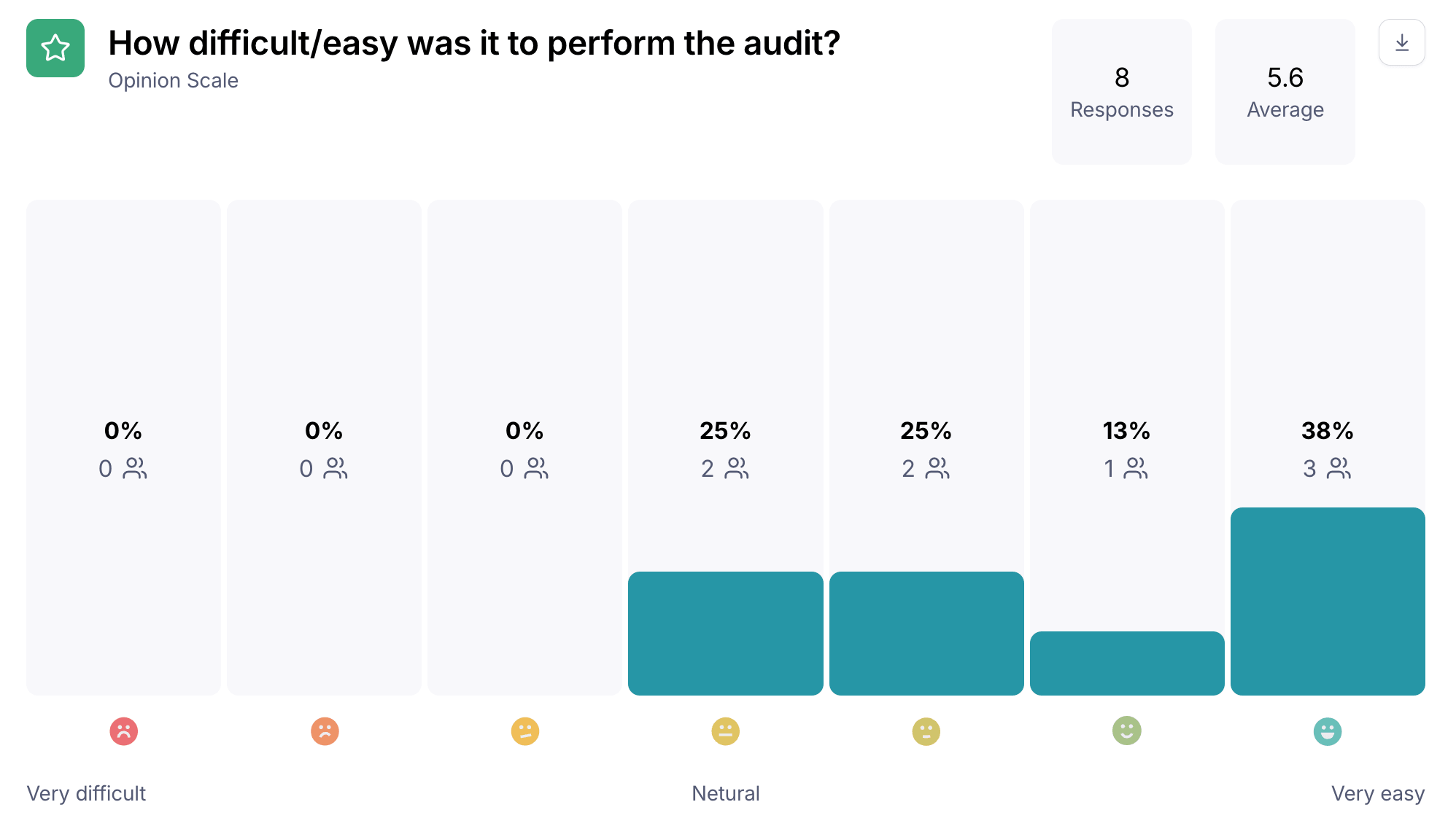
IMG 6 · Maze · How difficult or easy was it to perform the audit?
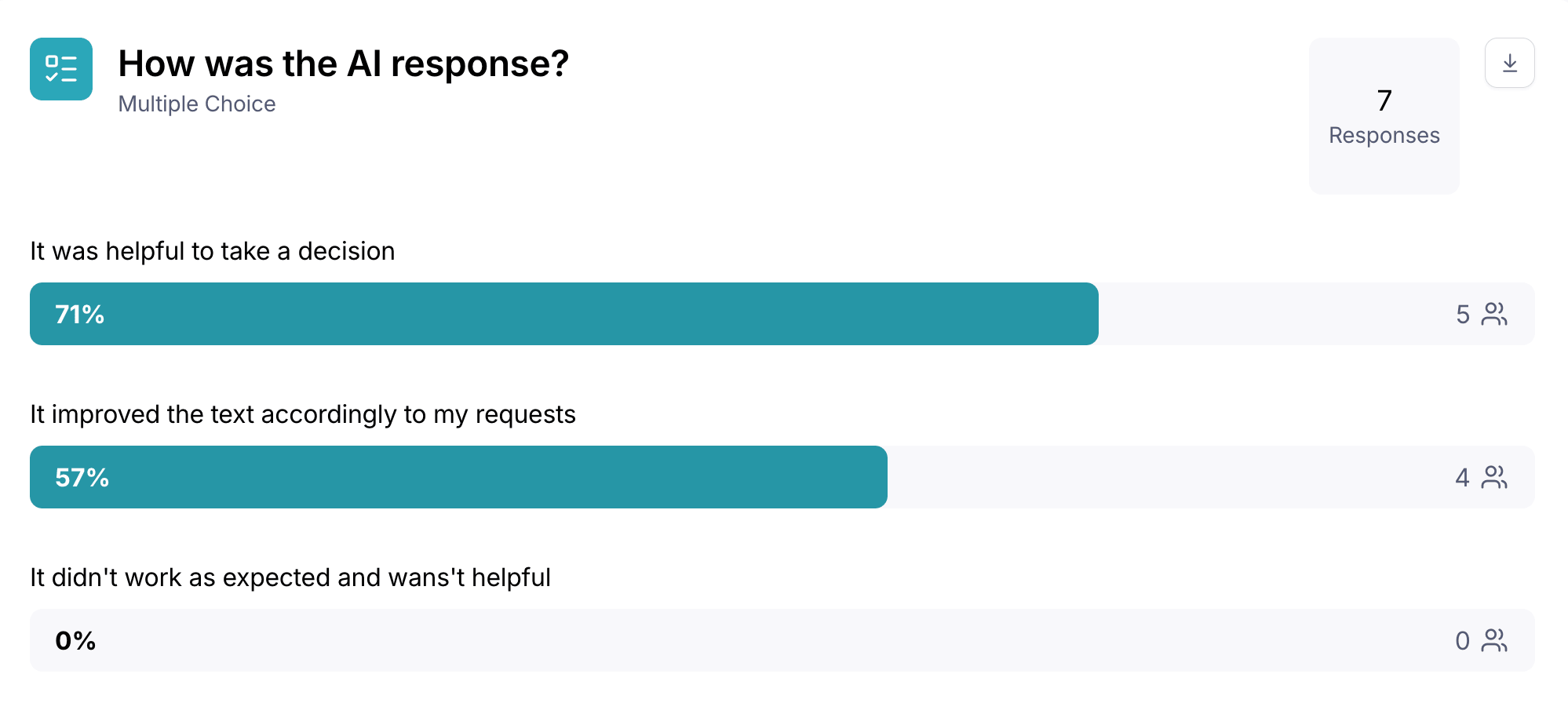
IMG 7 · Maze · How was the AI response?
who reported problems found the final summary and ticket inaccurate or generic. This was the weakest point. Two said the assistant misread their prompts and one found a wrong WCAG evaluation.
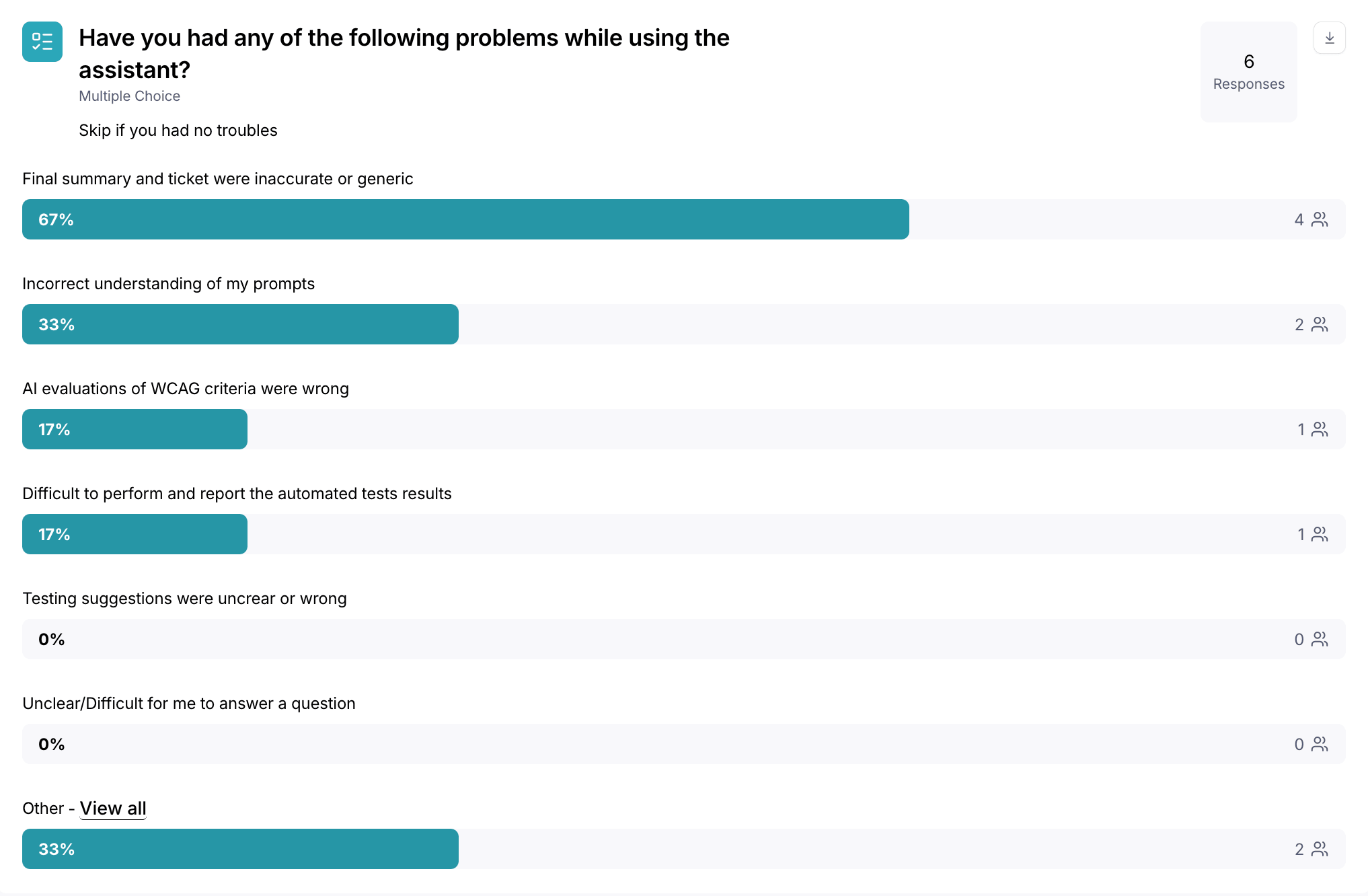
IMG 8 · Maze · Have you had any of the following problems?
05 / Results
Everyone could audit, and
experts could now complete
a page in under half the time.
15 non-experts joined the audit process. The drop in cognitive load was as significant as the time saved. Auditors could pause, return and pick up exactly where they left off. The process became interruptible.
| Before | After | |
|---|---|---|
| Who could audit | 2 experts | Everyone could operate it — 15 people joined the audit |
| Time per page | About 60 min, expert auditor | 20–25 min, expert auditor |
| Reporting | Manual spreadsheet notes and Jira writing | Generated at the end of the session |
| Focus | Continuous, could not be paused | Stop and resume freely |
| Knowledge | In two people’s heads | Encoded in the process |
06 / From prototype to platform
The proof of concept
became a company tool.
Shortly after deployment, I presented the assistant to Visma's group-level accessibility lead. She had been searching the market for exactly this kind of tool — and finding nothing. She took our version as a starting point, brought in a prompt engineer, and built an updated version covering both WCAG 2.1 AA and AAA, designed to work across all Visma companies and products. That version now runs as two Gemini Gems.
My role in the expansion was consultative — she came to me with questions about the original assistant's design decisions, edge cases in the prompt logic, and tradeoffs I'd encountered during testing. The InSchool version was a proof of concept. The Visma-wide version was built on what we learned.
In early 2026 I presented this work at the Visma AI Conference — an internal event with 530 attendees. The session, AI in Practice: Workforce Success Stories from within Visma, covered the assistant's origin, the design decisions behind the prompt, and the expansion across the organisation.
attendees at the Visma AI Conference, where I presented this work in early 2026.
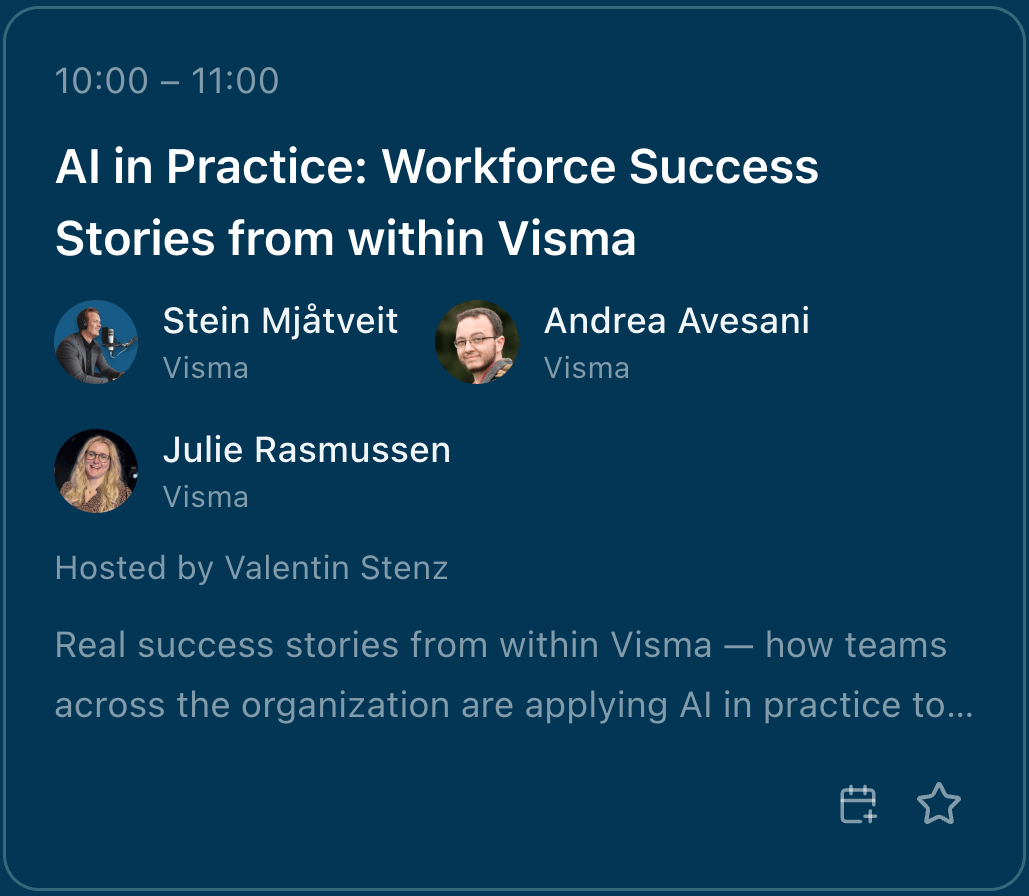
IMG 9 · The session covered the assistant’s origin, the prompt design decisions and the expansion across Visma.
07 / Reflection
What I would do differently.
Plan for handoff from the start
The tool was scoped to InSchool and its expansion was somewhat opportunistic. Separating product-specific logic from universal WCAG logic earlier would have made the Visma-wide version easier to build.
Document the prompt like a design file
The prompt went through many iterations, but I did not version-control or record the reasoning for each change. Treating it as an interaction design artefact would have smoothed the handoff.
Test with non-experts sooner
I optimised the prompt against my own expert judgment for too long. Less experienced auditors would have exposed language and pacing issues earlier.